

Most lawyers who try an AI assistant face the same challenge—AI is a useful tool, but it knows nothing about your firm. It can't see your matters, your calendar, your billing entries, or the document you finished yesterday. So you copy, paste, re-explain, and paste again.
The Model Context Protocol (MCP) is the standard built to fix that. It gives AI assistants a secure, structured way to reach the software your firm already uses. In this article, we’ll cover what a legal MCP is in plain English, how the technology works, what it can automate, and how to evaluate one before trusting it with client data.
One note up front: MCP is a connection standard, not a product from any single AI company. It works with various AI assistants, which is why this article remains broad rather than tied to a single tool. If you want the Claude-specific walkthrough, see our guide to Claude for lawyers .
What is an MCP server in legal tech?
An MCP or Model Context Protocol server is a small piece of software that sits in front of an application, such as your practice management system, and exposes specific, approved actions to an AI assistant.
In legal tech, that usually means an AI assistant can do things like look up a matter, pull a client's contact details, summarize recent time entries, or draft a document using information from your case management software. Without MCP, each of those connections would need custom engineering. With it, any compatible AI assistant can connect to any compatible server using the same standard.
Think of an MCP as a shared language. Your AI assistant and your practice management software don’t naturally speak the same language, so without an MCP, you end up acting as the interpreter, copying and pasting between them. With an MCP, they can talk directly.
A plain-English glossary for lawyers
Vendors throw around technical vocabulary freely. These are the terms worth knowing:
-
LLM (large language model): The AI engine behind assistants like Claude and ChatGPT. It generates text based on patterns it learned in training.
-
MCP (Model Context Protocol): The open standard that defines how an AI assistant talks to outside tools and data.
-
MCP server: The software that exposes a tool's data and actions to the AI through MCP.
-
MCP client (or host): The AI application you actually use, which connects to MCP servers on your behalf.
-
Connector: The user-facing name many AI apps give to an MCP connection. When a vendor says "connector," it usually means "an MCP server you can switch on."
-
Tool: A single action the server allows, such as "search matters" or "create a time entry."
-
API (application programming interface): A set of rules that lets one piece of software request data from another. MCP servers often use software APIs behind the scenes.
-
Plugin: An add-on built for one specific platform. Plugins generally only work inside the product for which they were made.
-
Agent: An AI setup that can take multiple steps on its own, such as finding a matter, reading its documents, and drafting a summary.
-
Prompt injection: An attack in which hidden instructions in a document or email try to trick an AI into doing something you didn't intend.
-
Sub-processor: Any third party a vendor uses to handle your data, such as a cloud host.
MCP vs. plugin vs. API: What's the difference?
These three often get confused, and the difference matters when you're comparing vendors.
-
An API is the doorway into a single application. It's built for developers, and someone has to write code to use it.
-
A plugin is an add-on designed for one platform, like an app within a specific AI assistant, and it doesn't work on other platforms.
-
An MCP server is a standardized layer that any compatible AI assistant can use, so you build the connection once and reuse it.
This is also the short answer to the common question about the difference between a legal MCP server and an API integration. An API integration is a custom bridge between two specific products. An MCP server is a standard connection point that multiple AI assistants can plug into, usually with a permissions layer designed for AI use. The API is often still there underneath, but MCP makes it usable by an AI without custom development for every pairing.
The two also move data differently. With an API, data typically moves between software on a scheduled, continuous, or event-driven basis, and a copy of that data is often stored in the receiving system. With MCP, data enters the AI tool only when a user requests it. An MCP connection doesn't keep a synced copy of your data the way an API integration can. But once the AI retrieves information to answer your request, that information is processed by the AI provider and is subject to that provider's data handling terms, so those terms belong on your vetting list.
How an MCP works with legal tech
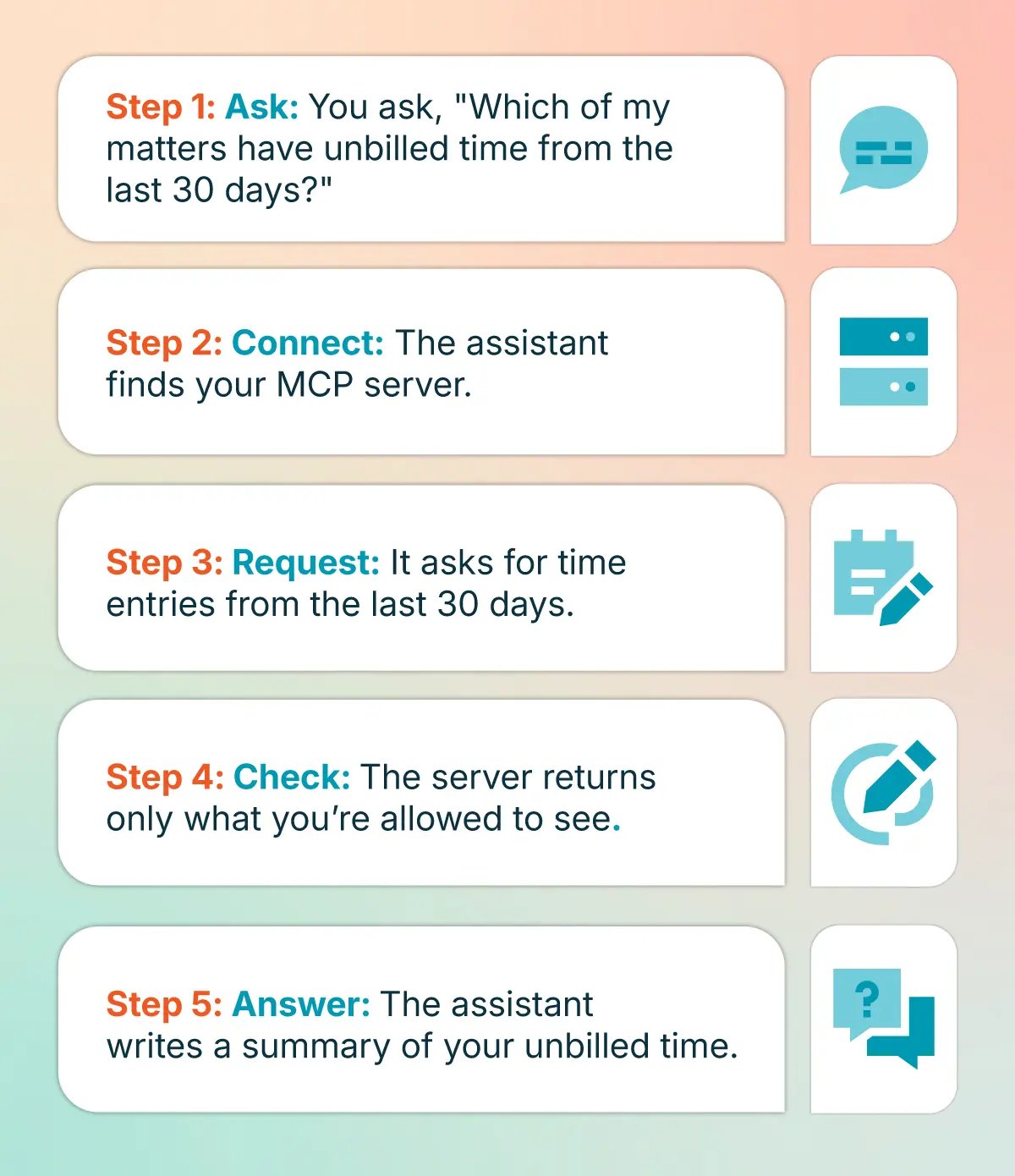
Let’s go over a scenario. Here's what happens when you ask your AI assistant, "Which of my matters have unbilled time from the last 30 days?"
-
You type the question into your AI assistant (the client).
-
The assistant recognizes that it needs firm data and sees that an MCP server for one of your legal tech tools, such as your practice management software, is connected.
-
It sends a structured request to that server, such as a search for time entries within a date range.
-
The server checks what you're permitted to see and returns only that data.
-
The assistant reads the results and writes you a plain-language answer. It can also provide a visualization for the answer with tables, charts, and graphs.
You never exported a spreadsheet or pasted anything. And because the server defines which tools exist, the AI can only do what the server allows. A server that offers "read matters" but not "delete matters" simply can't be talked into deleting one.
Examples of what lawyers can handle with an MCP
The possibilities are close to endless. Once an AI assistant is connected to the right tools, it can pull and work with almost any information those tools hold. The real value of an MCP integration for legal tech automation lies in removing repetitive copying between systems. For a practice management MCP, here are some examples of what that can look like:
The real value of an MCP integration lies in removing repetitive copying between systems. Common workflows include:
-
Matter and client lookups: Ask for case status, deadlines, or contact details in a sentence instead of clicking through screens.
-
Billing and time review: Surface unbilled time, flag unusual entries, or draft invoice narratives from your own records.
-
Document-aware drafting: Draft a client update or demand letter using facts that already live in the matter file.
-
Intake and follow-up: Summarize new leads, draft follow-up messages, and prepare consult notes.
-
Daily briefings: Ask for a rundown of today's calendar, open tasks, and upcoming deadlines across matters.
These are only a starting point. If you can ask a question about your firm's data in plain language, an MCP can likely help you answer it.
MCP use cases for legal tech: Research and practice management
When people search for a legal MCP, they're often looking at two quite different categories.
-
Legal research MCP servers connect an AI assistant to case law, statutes, regulations, or court records. Their value depends on the authority and freshness of the underlying source, and on whether the AI returns citations you can verify.
-
Practice management MCP servers connect an AI assistant to your firm's own operational data: matters, contacts, calendars, time, billing, and documents. 8am™ MyCase MCP is the first MCP built for legal practice management software. Its value, like any in this category, depends on how complete your data is and how carefully permissions are handled.
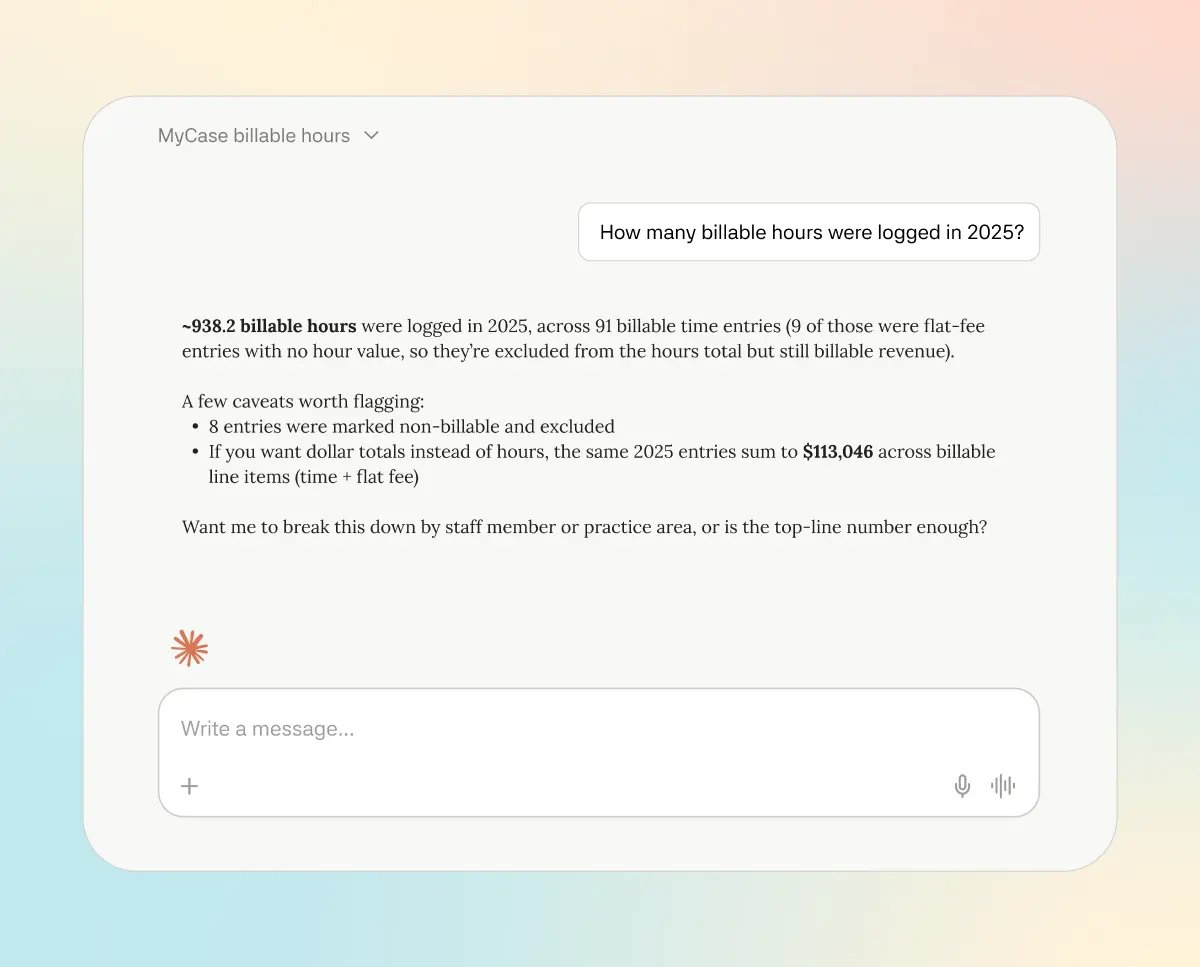
So, what’s the best MCP server for legal research with Claude, or any other assistant? There isn’t a single winner, and anyone claiming otherwise deserves some skepticism. The right choice depends on jurisdiction, practice area, and which sources are already trusted.
When evaluating a legal research MCP, five questions matter most:
-
Where does its data come from?
-
How current is it?
-
Does it cite primary sources?
-
How does it handle queries?
-
Can you verify every source it cites?
Whichever option is chosen, its output should be treated as a first draft, not a finished product. AI can still make confident-sounding mistakes, which is why our guide on the best AI for legal writing stresses review at every step.
Is it safe? An ethics and confidentiality framework
The honest answer to "Is it safe to connect client data to an MCP server?" is: It depends on the server, the vendor, and how you set it up. That includes which plan you're on. Some vendors offer consumer plans governed by consumer terms of service and separate commercial plans governed by commercial terms, and commercial terms often carry stricter data protection commitments. Before connecting client data, confirm which terms apply to your account. Connecting client data to any third-party tool engages your professional duties, so treat this as an ethics decision, not just an IT decision.
Start with these questions, and check your own state bar's rules and guidance, which vary:
-
Competence: Under ABA Model Rule 1.1 , competence includes understanding the benefits and risks of the technology you use. You don't need to be an engineer, but you should know what the tool can access and what it can do.
-
Confidentiality: Under Rule 1.6 , you must make reasonable efforts to prevent unauthorized disclosure of client information. Ask exactly what data leaves your system, where it goes, and whether it's used to train AI models.
-
Supervision: Under Rules 5.1 and 5.3 , lawyers are responsible for supervising staff and nonlawyer assistants, a standard that regulators increasingly apply to AI tools. Someone at your firm must own the review of AI output.
-
Client communication: ABA Formal Opinion 512 (2024) on generative AI discusses when informing clients about AI use may be appropriate. Review your engagement letter language and your state's guidance on whether disclosure is needed.
-
Insurance: Ask your malpractice carrier whether it has any requirements or questions regarding the use of AI tools. Policies and expectations differ, and it's better to ask before an incident than after.
None of this is a reason to avoid MCP. It's a reason to adopt it deliberately. This article is general information, not legal advice, and your firm should confirm requirements with its own ethics counsel or bar.
A vendor-vetting checklist
Before you approve any MCP server, whether it's for research or practice management, get clear answers to the following:
-
Data residency: Where is data processed and stored?
-
Encryption: Is data encrypted in transit and at rest?
-
Sub-processors: Who else has access to your data, and can you see the list?
-
AI training: Is your data ever used to train models? The answer should be a clear no.
-
Permissions: Does the server respect each user's existing access rights, or does it expose everything to everyone?
-
Scope: Which actions are read-only, and which can change or delete records?
-
Audit logs: Can you see what the AI accessed and when?
-
Security posture: Does the vendor have independent security audits or certifications, and how does it defend against prompt injection?
-
Revocation: Can you disconnect the server instantly and confirm access has ended?
-
Support and accountability: Who do you call when something goes wrong?
-
Terms of service: Do they commit to data confidentiality?
Be wary of any vendor that can't answer these plainly. A directory listing or an open-source repository isn't a security review, and an MCP connection alone doesn't guarantee privacy.
How to set up an MCP connection safely
Connecting an AI assistant to firm data is easiest to get right when it’s done in small, deliberate steps, such as:
-
Pick one low-risk workflow first. Start with something like summarizing your calendar or reviewing unbilled time, not client-facing drafting.
-
Vet the vendor using the checklist above and document your answers.
-
Set a firm policy covering who may connect tools, which data is in scope, and who reviews AI output.
-
Connect with the minimum access needed. Prefer read-only access until you trust the workflow.
-
Test with non-sensitive or dummy data before using live matters.
-
Train your team on verification, prompt injection, and what never goes into an AI chat.
-
Review and revisit. Check access logs periodically and remove connections you no longer use.
What this looks like with MyCase MCP: If your firm uses MyCase, setup follows the same pattern. Add the MyCase connector in Claude, sign in to your MyCase account, and approve the connection. Then start with one of the low-risk workflows above, such as asking for a summary of today's calendar or a list of matters with unbilled time.
Put your data to work with the MyCase MCP
Ready to put these principles into practice? The MyCase MCP connects an AI assistant to the information in your MyCase account, so you can work with your matters, contacts, and billing in conversation without ever leaving the assistant. See how it works on the MyCase MCP page , and the MyCase MCP support article walks through the setup step by step.
For firms that want to see the bigger picture of how MyCase and its other products approach legal AI across the practice, explore the 8am IQ overview or book a demo of MyCase today.
About the author

Mary Elizabeth Hammond is a Senior Content Strategist and Blog Specialist for 8am, a leading professional business solution. She covers emerging legal technology, financial wellness for law firms, the latest industry trends, and more.