

Key takeaways
-
Tool choice depends on task risk : General-purpose AI (Claude, ChatGPT) offers flexibility but lacks legal safeguards; purpose-built legal AI adds citation checks, security, and matter-level integration.
-
Attorney review is always required : Every AI output needs human verification before reaching a filing, client, or court—no tool is exempt.
-
Embedded workflows lower risk : Tools that stay inside the matter record cut copy-paste errors and version-control issues compared to standalone platforms.
Drafting takes time that doesn't bill. Every hour spent on a first draft, a routine correspondence, or a document summary is an hour not spent on the work clients actually retain you for. AI promises to close that gap, but the right fit depends on your practice type, risk tolerance, and how each tool handles your client data.
This guide breaks down the best AI tools for legal writing—from purpose-built platforms like MyCase IQ to general-purpose models like Claude and ChatGPT—so you can see what each one does well, where it falls short, and how it fits into your existing workflow. It won't tell you how to practice law. It will help you evaluate where AI fits, what to check before adopting any tool, and where attorney judgment still has to do the work.
Disclosure: This guide is published by 8am, the company behind 8am IQ and MyCase, one of the tools reviewed below. We've aimed to give every tool, including our own, a fair and accurate assessment, but keep that relationship in mind as you read.
Before diving into specific tools, it helps to understand what you're actually asking AI to do. For more insights across everything from AI ethics to legal research to firm productivity, explore our AI for Law Firms Resource Center for the full library of expert articles.
What to look for in AI tools for legal writing
To truly meet the demands of legal practice, the most effective AI writing tools go beyond general intelligence—they’re purpose-built for law. General-purpose tools work fine for everyday writing, but firms handling sensitive case data or citations increasingly turn to legal-specific AI, where confidentiality and accuracy aren't negotiable.
Before adopting any tool, evaluate it against:
-
Accuracy controls : Ask how it handles citations and what happens when it doesn't know an answer.
-
Data handling : Confirm where your data goes, how long it's retained, and whether it trains the model.
-
Workflow integration : Check whether it connects to your matter record or requires risky copy-paste.
-
Security posture : Look for SOC 2 Type II / PCI compliance, backed by documentation.
-
Practice-area fit : Choose tools built for legal workflows, not just adapted to them.
-
Governance : Put a firm policy in place covering use, review, and how errors get caught before anything ships.
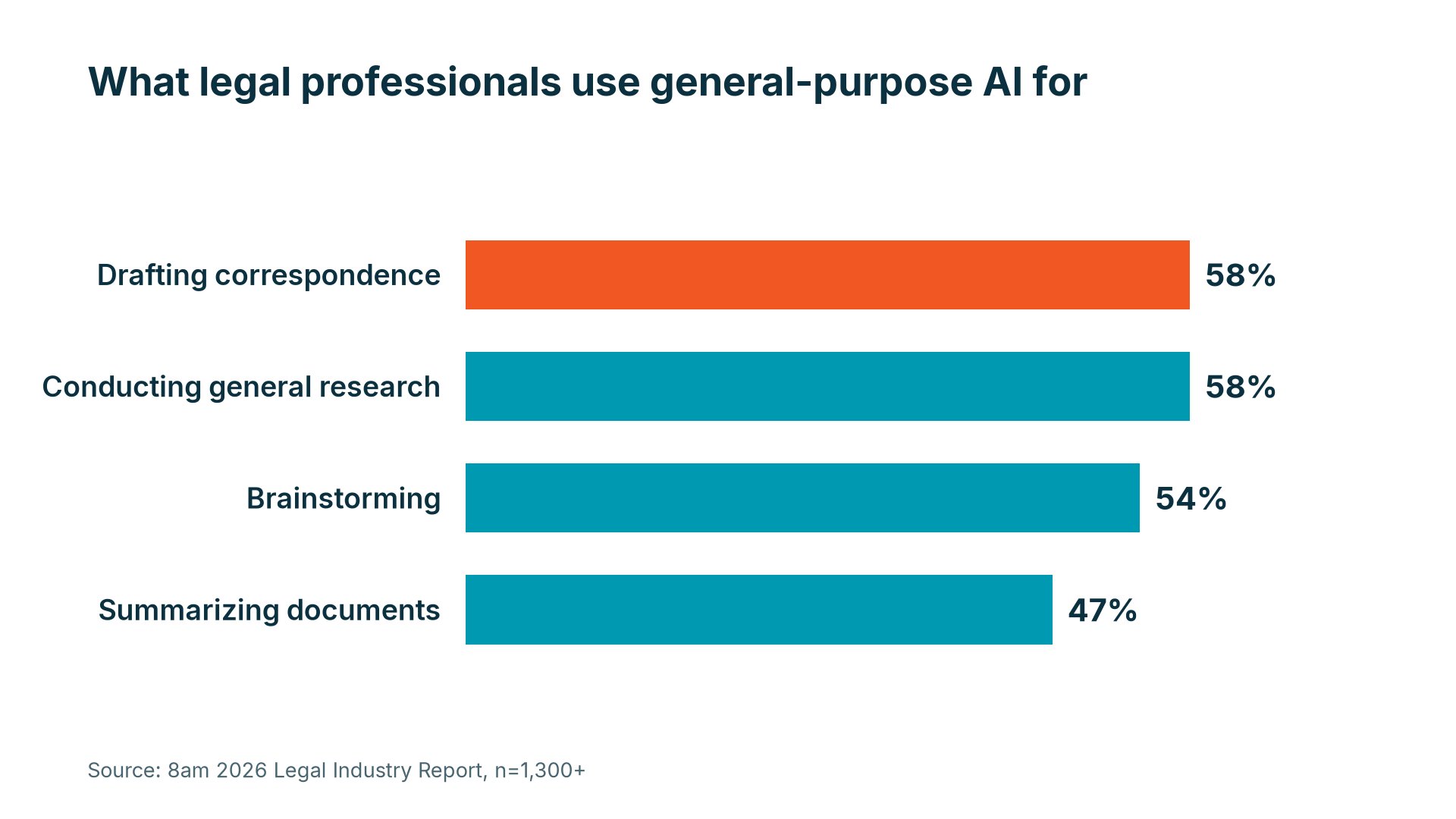
According to the 2026 Legal Industry Report , 58% of legal professionals now use general-purpose AI for drafting correspondence, making it the most common legal use case, tied with general research (also 58%). Others include summarizing documents (47%), drafting document templates (39%), and editing (37%).
AI generates a starting point, not a finished product—the attorney still reviews, refines, and owns the output.
The 8 best AI tools for legal writing in 2026
Before diving into each legal AI writing tool, here's a quick reference across all eight options covered in this article. Use it to orient your evaluation, then follow the anchor links to the full write-ups below.
| Tool | Best for | Key capability | Security/data handling | Workflow fit | Pricing model |
| Firms wanting AI built into their practice management | Drafting, editing, and summarizing within the case file | SOC 2 Type II; client data stays within your firm's secure environment | Fully integrated with matters, billing, and documents | Included with MyCase subscription tiers | |
| Litigators focused on citation accuracy | Automated citation linking and factual verification | Works within MyCase integration; verify vendor data practices directly | Integrates with MyCase | Subscription; verify with vendor | |
| High-volume litigators drafting court-ready documents | Automated brief organization and formatting | Verify data handling and retention policies with vendor | Integrates with MyCase | Subscription; verify with vendor | |
| Draftwise | Firms drafting and negotiating contracts from their own precedent library | Precedent-based drafting and negotiation benchmarking | SOC 2 Type II and ISO 27001 certified; verify vendor data practices | Standalone; works inside Word | Subscription; verify with vendor |
| Transactional lawyers working in Microsoft Word | AI-assisted contract drafting and clause review | Operates within Microsoft Word environment; verify vendor policies | Standalone; works inside Word | Subscription; verify with vendor | |
| Briefcatch | Litigators refining brief and motion prose | Legal-specific writing analysis and editing suggestions | SOC 2 certified; zero data retention, no training on user text | Standalone; works inside Word | Subscription; verify with vendor |
| Early-stage drafting and document summarization | Long-document summarization and argument outlining | General-purpose tool; no legal-specific confidentiality controls | Standalone; no native legal integrations | Free tier and paid plans; verify with vendor | |
| Flexible drafting, editing, and tone refinement | Broad writing assistance with prompt-guided output | General-purpose tool; no legal-specific confidentiality controls | Standalone; no native legal integrations | Free tier and paid plans; verify with vendor |
* Pricing structures and feature sets change. Confirm current details directly with each vendor before making a purchasing decision.
1. 8am IQ for MyCase
8am IQ is a first-party set of AI tools built directly into 8am MyCase—not a separate platform you connect to, but a set of capabilities that operate inside the matter environment you're already working in. There's no context switching, no uploading client files to external platforms, and no copy-paste risk. Every interaction stays within the case record, and MyCase is SOC 2 Type II certified and IOLTA Level 1 compliant, with client data never used to train third-party AI models.
Best for: Firms wanting AI built into their practice management, with no separate platform to manage.
Key capabilities:
-
Cited answers pulled from the full case record—files, notes, messages, and text (SMS) logs
-
Optical character recognition (OCR) and key-detail extraction across documents (parties, dates, clauses, obligations)
-
Native MyCase integration—no separate platform, uploads, or copy-paste risk
Limitations: Best suited to firms already using MyCase; the value comes from the embedded workflow, so it's less relevant as a standalone tool outside that environment.
2. Clearbrief
Clearbrief automates citation linking, connecting each factual statement in a brief directly to the underlying source document. It checks formatting and flags unsupported claims before a filing goes out, integrates with MyCase , and gives attorneys a way to verify a brief without leaving the platform or managing files across separate systems.
Best for: Litigation-focused firms that need every factual claim in a brief verified and traceable to its source document.
Key capabilities:
-
Automated citation linking between briefs and source documents
-
Formatting checks and unsupported-claim flagging before filing
-
Direct integration with MyCase matter records
Limitations: Purpose-built for citation accuracy and brief credibility, not general-purpose drafting—firms needing broader support across document types will want to pair it with another tool. Review Clearbrief's data handling terms directly with the vendor before routing client documents through it.
3. Briefpoint
Briefpoint is purpose-built for litigators who need to move from argument outline to court-ready document without losing hours to manual formatting. It handles the structural and administrative side of drafting motions and briefs—organizing arguments, applying formatting standards, and pulling in key references—and integrates directly with MyCase , keeping work connected to the matter record.
Best for: Litigation-focused firms that need consistent, formatted brief output at volume.
Key capabilities:
-
Automated brief organization and formatting
-
Reference pulling and standardization across documents
-
Direct integration with MyCase to reduce version-control risk
Limitations: Focused on discovery and brief formatting rather than broader legal drafting—firms with varied document needs will still need additional tools.
4. Draftwise
Draftwise is a contract intelligence platform built for firms and in-house teams that draft, review, and negotiate high volumes of agreements. Rather than starting from a blank page, it pulls from an organization's own precedent library to generate client-ready drafts, analyze incoming redlines against past deal patterns, and benchmark terms against historical deals or public filings—applying a firm's established preferences and standards to every contract.
Best for: Big Law firms standardizing contract work firm-wide, mid-size firms handling personalized client deals, and in-house teams (SaaS, real estate, life sciences, defense tech, investment funds) negotiating agreements at volume.
Key capabilities:
-
Precedent-powered drafting and research across an organization's own document history
-
Deal table analytics organizing negotiated terms by client, counterparty, or industry
-
Playbook Studio and a Knowledge Console for codifying and governing institutional drafting standards
-
Market benchmarking against deal history and public filings to flag outlier terms
Limitations: Draftwise's usefulness depends on the quality and completeness of the precedent library it draws from—a firm with thin or inconsistent historical documents will get thin suggestions. It also operates as a Word add-in focused on contracts, so it isn't built for litigation drafting. Like any AI drafting tool, its output still needs attorney review before it goes into a live negotiation or filing.
5. Spellbook
Spellbook is an AI for legal drafting tool built specifically for contract work. It runs as a Word add-in, which means transactional lawyers can use it for AI-assisted contract drafting and review without leaving the document they're already working on—suggesting language, analyzing clauses, and flagging risks along the way.
Best for: Transactional lawyers working in Microsoft Word on purchase agreements, NDAs, commercial leases, or complex multi-party contracts.
Key capabilities:
-
Suggested language and clause analysis during drafting
-
Risk flagging and consistency checks across a document
-
Native operation inside Word, with no platform switching or copy-paste
Limitations: Purpose-built for transactional contract work; it doesn't cover litigation drafting or broader case management, so it works best as a standalone add-on rather than a full workflow solution.
6. Briefcatch
BriefCatch is AI-powered editing software built for lawyers who want sharper, more persuasive prose in the documents they already draft. Rather than generating new text, it reads a brief, motion, memo, or contract you've written and returns contextual line edits grounded in legal writing standards—catching wordiness, passive voice, weak transitions, and tone problems an attorney might miss on a final read-through.
Best for: Litigators and in-house teams who want every brief, motion, or memo tightened before it goes out—firms training associates on writing standards, government legal departments, and court systems, among them.
Key capabilities:
-
Legal-specific writing analysis with scoring metrics tied to clarity, concision, and persuasiveness
-
Contextual, explanatory editing suggestions that double as associate training
-
Native Microsoft Word add-in, so documents are edited in place with no upload to outside servers
Limitations: BriefCatch edits existing text rather than drafting or verifying it—it won't generate a first draft, check citations, or confirm that facts and case law are accurate. It's a polish layer on top of an attorney's own drafting, not a substitute for the substantive review that has to happen before a document is filed or sent to a client.
7. Claude
Claude , developed by Anthropic, is a general-purpose conversational AI that attorneys have found useful for summarizing long documents and outlining complex arguments before drafting begins. Its longer context window means it can process more text in a single session than many comparable tools, which makes it practical for dense discovery materials or lengthy contracts. Firms on MyCase can also connect Claude directly to their matter data through the MyCase MCP integration .
New to MCP? Watch the on-demand webinar to see how setup works.
Best for: Reviewing lengthy documents and shaping early drafts.
Key capabilities:
-
Long-document summarization for dense discovery materials or contracts
-
Argument outlining before drafting begins
-
Brainstorming and document-shaping support in early-stage matter work
Limitations: A general-purpose tool, not a legal-specific platform—no built-in matter data access, citation verification, or purpose-built confidentiality controls. Any output needs attorney review before it goes near a filing, a client, or opposing counsel. Additionally, matter updates need regular maintenance.
8. ChatGPT
ChatGPT is a general-purpose AI model, not a legal-specific tool. It handles routine first drafts, tone adjustments, and content restructuring reliably when given clear context and precise prompts—useful for jump-starting correspondence or working through a structural problem in a document before refining it further.
Best for: Flexible drafting, editing, and tone refinement.
Key capabilities:
-
Routine first drafts and content restructuring from prompts
-
Tone adjustments and editing suggestions
-
Broad flexibility across writing tasks outside legal-specific work
Limitations: No access to matter data, no legal-specific guardrails, and no built-in citation verification. It doesn't know your jurisdiction, your client's facts, or your firm's prior work product—output requires careful review before it goes anywhere near a filing or a client.
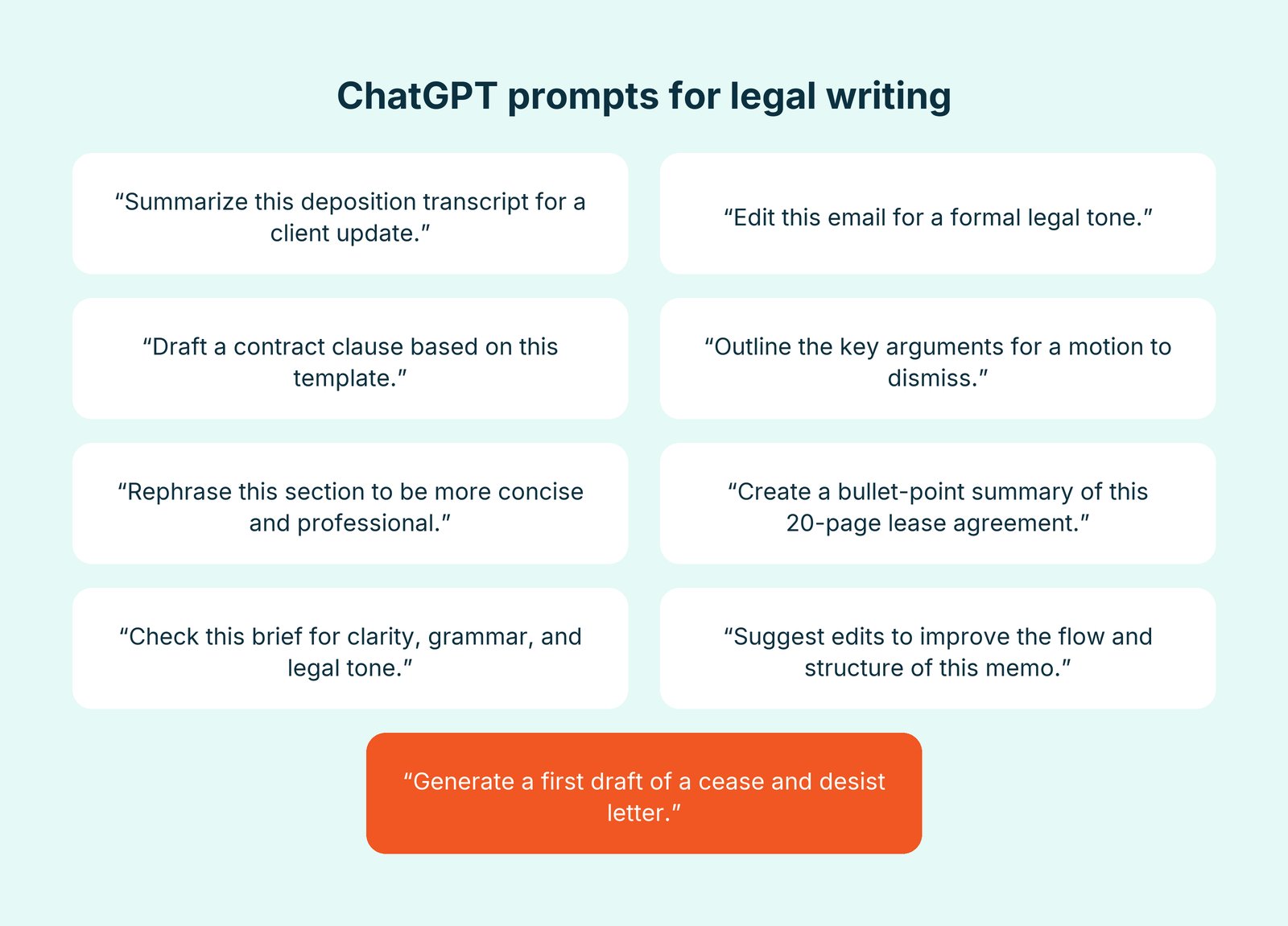
For a closer look at how to get the most out of this tool, check out this article: ChatGPT for legal tasks .
How lawyers use AI for legal writing
Below are some of the most common and impactful ways attorneys are using AI to improve efficiency, accuracy, and client communication.
Drafting legal documents
Whether you're drafting retainer agreements, motions, or business contracts, legal AI document tools like 8am IQ and Gavel generate full drafts from templates or case data, reducing copy-paste errors while drafting directly within your case management system. With the best AI for legal drafting, firms gain consistency and free up hours for higher-value work.
Writing and reviewing legal briefs
Legal brief writing demands clarity, structure, and strong legal reasoning—tools like Briefpoint and Clearbrief help by organizing content, checking formatting, and verifying citations while preserving the lawyer's voice.
Summarizing legal content
Attorneys often need to quickly absorb and relay the meaning of dense documents like depositions, discovery responses, or court rulings. Tools such as 8am IQ and Claude serve as AI legal judgment summarization tools , pulling key points in seconds for fast, accurate client updates or team briefings.
Editing legal writing
Rewriting legal content for tone, clarity, or brevity can be time-consuming, especially under a tight deadline. AI tools speed this up with intelligent, goal-based editing suggestions—whether you're cleaning up a draft or adjusting the tone for a client-facing memo.
Translating legal documents
In a multilingual legal environment, translation matters. AI tools now provide instant translation of legal materials , such as affidavits, intake forms, and client emails, without the need for outside vendors. Solutions like 8am IQ help firms communicate clearly and accurately with clients in their preferred language while maintaining the integrity of legal content.
How 8am IQ for MyCase fits into your legal writing workflow
Most AI writing tools sit outside your matter environment—copying text out, pasting it into a separate platform, reviewing the output, and bringing it back, all while managing version risk and working from context the tool can't see. That gap matters: incomplete context produces output you have to heavily revise, and every round trip is time you don't bill.
8am IQ for MyCase works inside the matter environment instead, accessing only data you already have rights to view. No uploads, no copy-paste, no separate login.
Four capabilities cover the core workflow:
-
Writing Assistant drafts and edits notes, invoices, and correspondence in place—adjusting tone, fixing grammar, summarizing, or translating into Spanish or Arabic without leaving the matter record.
-
Document Assistant summarizes a document's key details—parties, dates, obligations, clauses—the moment you open it, cutting down front-end reading time.
-
Discovery Assistant uses embedded OCR to convert scanned PDFs and images into searchable text, which feeds directly into Document Assistant and Case Assistant.
-
Case Assistant searches across case files, notes, messages, and call logs to answer questions from your own matter data, with citations so you can verify the source.
Additionally, MyCase is SOC 2 Type II certified and IOLTA Level 1 compliant, and client data stays within the matter record rather than being routed through external platforms.
If you're evaluating AI for legal writing or AI for legal drafting, start with a tool that works inside your existing matter environment, keeps client data secure, and gives you a clear verification path for every output. Before you roll a tool out, see our guide to adopting AI for legal writing safely , covering scope, review standards, and firm policy
See how MyCase IQ handles drafting, editing, and tone adjustment inside your workflow— schedule a demo today .
About the author

Mary Elizabeth Hammond is a Senior Content Strategist and Blog Specialist for 8am, a leading professional business solution. She covers emerging legal technology, financial wellness for law firms, the latest industry trends, and more.